

Production agents need scoped, selective recall—not an ever-growing prompt filled with every conversation they have seen.
More context is not better memory
The simplest memory implementation stores a transcript and sends a larger slice of it with every new request. That approach works in a demo because the history is short and the user population is small.
In production, transcripts become noisy, expensive, and difficult to govern. Old preferences conflict with new ones, repeated details consume tokens, and unrelated conversations weaken the signal the model actually needs.
AGIHALO treats memory as a retrieval system. The model asks for memory only when it can improve the current decision, Halo selects a small relevant set, and the application feeds that result back as a tool response instead of pasting an entire transcript into every prompt.
The four layers of an AGIHALO memory project
Every request carries an explicit Halo API key, project key, and end-user key. The API key authorizes the call, the project key identifies the memory product or environment, and the end-user key isolates one customer inside that project.
Inside each end-user scope, Halo keeps an overall summary, topic summaries, and linked raw exchanges. The overall summary is broad continuity. Topics such as food_preferences or billing_history narrow retrieval. Raw entries remain available when the model or an operator needs the original evidence behind a summary.
- Project: a named memory workspace created before capture begins.
- End user: a customer-controlled identifier such as user_123.
- Summary and topics: compact context optimized for selective recall.
- Raw entries: the captured user and assistant exchanges linked to topics.
The AGIHALO memory user flow
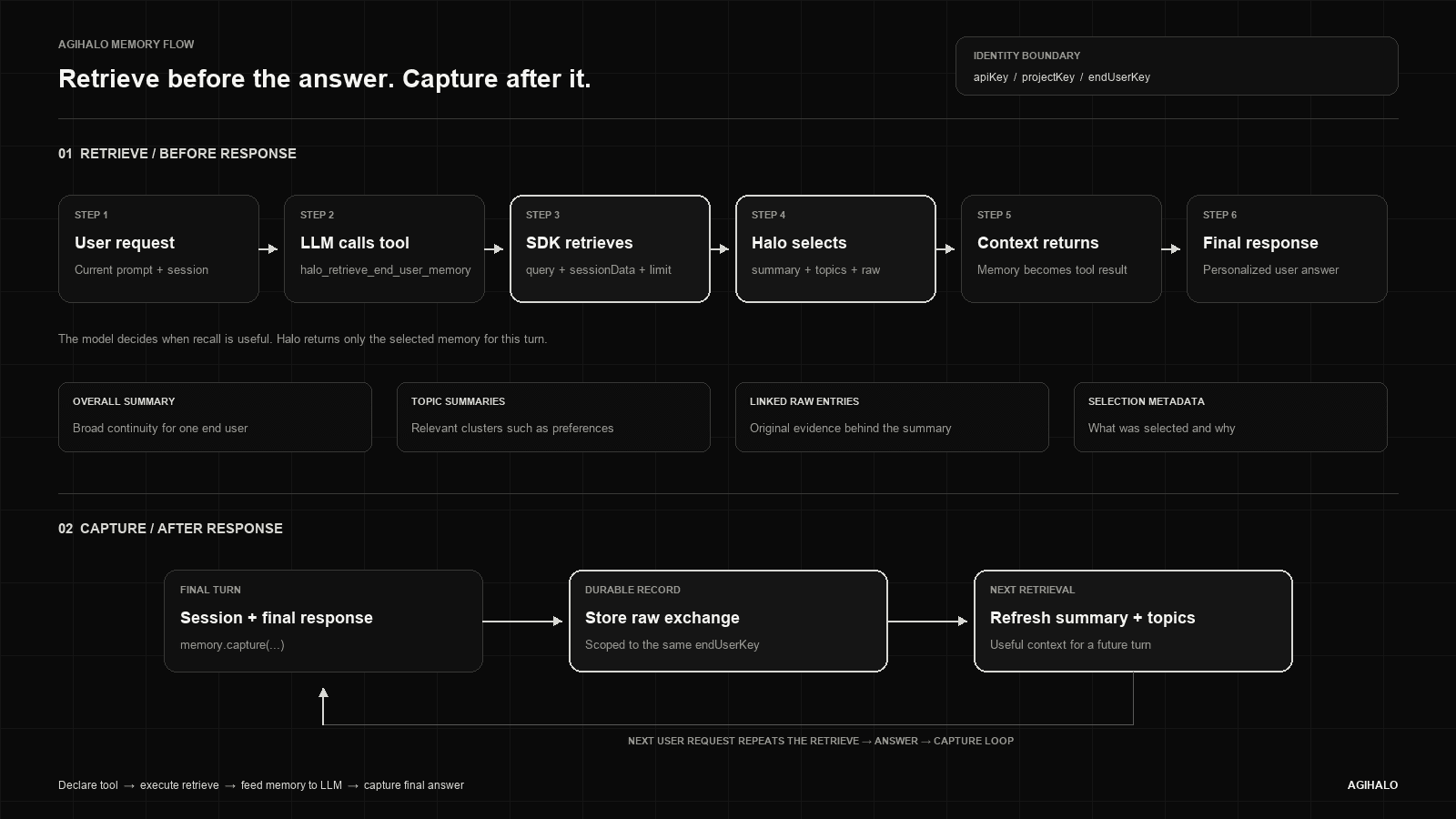
A complete turn has two memory operations. Retrieval happens before the final answer, after the LLM chooses the Halo memory tool. Capture happens after the final answer, so Halo stores what the user said together with the response the product actually delivered.
Keeping those operations separate prevents incomplete drafts from becoming memory and lets the model decide when historical context is useful. The same apiKey, projectKey, and endUserKey boundary is preserved across both halves of the loop.
1. Declare the Halo retrieve function
Initialize the memory client with explicit credentials. Node applications use agihalo-node-sdk with apiKey and projectKey; Python applications use halo-sdk with api_key and project_key. The memory project must already exist—capture does not silently create one.
Expose memory.functionDeclaration() to the model’s tool list. This declaration gives the model one stable function name, halo_retrieve_end_user_memory, and lets the model choose whether the current request needs recall.
import { HaloMemoryClient } from "agihalo-node-sdk";

const memory = new HaloMemoryClient({
  apiKey: "sk-...",
  projectKey: "customer-support-memory",
});

const tools = [memory.functionDeclaration()];
2. Execute retrieval and return it to the LLM
When the model calls halo_retrieve_end_user_memory, execute the Halo function with the end-user key and the current session. The optional query tells Halo what the model is trying to recall, while limit bounds the raw evidence returned.
Halo evaluates the current session against the end user’s retrievable topics. The result can include the overall summary, selected topic summaries, linked raw entries, and selection metadata. Feed that function result back to the same LLM turn so the model can produce the final answer with relevant history.
const haloMemory = await memory.executeRetrieveFunction({
  endUserKey: "user_123",
  sessionData: {
    messages: [
      { role: "user", content: "Plan dinner around my preferences" },
    ],
  },
  query: "food preferences",
  limit: 5,
});

// Return haloMemory as the tool result, then let the LLM answer.
Retrieve only what can change the next answer—not everything the user has ever said.
3. Capture only the completed exchange
After the model returns its final assistant response, call capture with the same end-user key, the session messages, and the exact response shown to the user. This ordering matters: the durable record should represent the completed product interaction, not an intermediate model draft.
Halo stores the raw exchange and creates the memory processing job. The memory worker classifies each raw exchange into an existing topic when it fits, creates a new topic only when needed, refreshes topic summaries, and updates the end-user overall summary. Those compact layers become available to later retrievals.
await memory.capture({
  endUserKey: "user_123",
  sessionData: {
    messages: [
      { role: "user", content: "Plan dinner around my preferences" },
    ],
  },
  response: {
    role: "assistant",
    content: "Let's choose a low-carb dinner with no cilantro.",
  },
});
Operate memory from the dashboard
The Memory dashboard exposes the same hierarchy used by the SDK. Teams can open a project, select an end-user scope, inspect the overall summary, browse topics and raw entries, and review recent capture or retrieve executions.
Retrieval can be disabled for an individual topic without deleting its data. For direct product or admin workflows, POST /api/v1/memory/retrieve supports topic filters, includeRaw, and disabled-topic controls. POST /api/v1/memory/delete can remove a raw entry, topic, end-user scope, or project according to the supplied target.
- Inspect: overall summary, topic summary, confidence, raw count, and linked entries.
- Control: disable a topic for retrieval while retaining it for review.
- Delete: target a raw entry, topic, user scope, or entire project.
- Observe: review capture and retrieve jobs for each memory project.
A production checklist
The smallest correct integration follows one strict sequence. It keeps identity explicit, lets the model request memory, and writes only the answer the user actually received.
- Create the memory project and keep projectKey separate from the Halo API key.
- Initialize the SDK with explicit apiKey and projectKey values.
- Declare halo_retrieve_end_user_memory in the model’s tool list.
- Execute the Halo retrieve function only when the LLM calls it.
- Feed the returned memory into the LLM as the tool result.
- Capture the final assistant response after the user-facing answer exists.
- Use direct retrieve and delete endpoints for inspection and lifecycle control.
AGIHALO memory is controlled continuity: the right context, for the right end user, at the moment it can improve a decision.